


Timekeeping errors are the single most common reason government contractors fail DCAA audits. This guide is for contractors of every size, from SBIR awardees to established professional services firms, who need DCAA-compliant time tracking software that keeps timesheets accurate, defensible, and audit ready.
One thing to know before you compare vendors: the DCAA does not certify or approve any time tracking software. The Defense Contract Audit Agency audits your timekeeping practices, controls, and records, not the brand name on the timesheet. Below, we cover the DCAA time tracking requirements, compare the seven best systems, and show you how to choose the right fit for your contracts.
Key Takeaways
- No time tracking software is officially DCAA-approved. The DCAA audits your timekeeping practices, records, and internal controls, not the software.
- DCAA timekeeping requirements center on daily time entry, total time accounting, correct project codes, supervisor approval workflows, and a detailed audit trail on every change.
- Timekeeping is the number one audit failure point. Floor checks can happen unannounced on any contract, so compliant time tracking matters even before cost-type awards.
- BigTime gives professional services firms DCAA-compliant time tracking with audit trails and approvals inside a full PSA platform, not a standalone timesheet.
- Paper and spreadsheets technically qualify but carry high error risk. Electronic timekeeping systems are the practical standard for maintaining DCAA compliance.
What Does “DCAA-Compliant Time Tracking Software” Actually Mean?
Start with the misconception: the DCAA does not approve, certify, or endorse any time tracking system. DCAA-compliant timekeeping means your practices follow the guidance in the Federal Acquisition Regulation and the DCAA’s Contract Audit Manual: employees track time daily, charge hours worked to the correct cost objectives, supervisors approve timesheets, and every correction leaves a documented trail. The software either enforces those habits or leaves you exposed.
Why does the DCAA care so much about time entries? Because on government contracts, labor costs are usually the largest cost element and the easiest to misstate, and taxpayer money is on the line. Unlike accounting systems, which are examined mainly for cost-reimbursable contracts, DCAA-compliant timekeeping applies broadly: labor charging supports billing on cost-type and T&M work, feeds indirect costs and incurred cost submissions, and can be tested through unannounced floor checks on virtually any contract. Failed timekeeping can mean disallowed labor costs, payment withholds, or even contract termination.
DCAA Timekeeping Requirements: What Auditors Expect
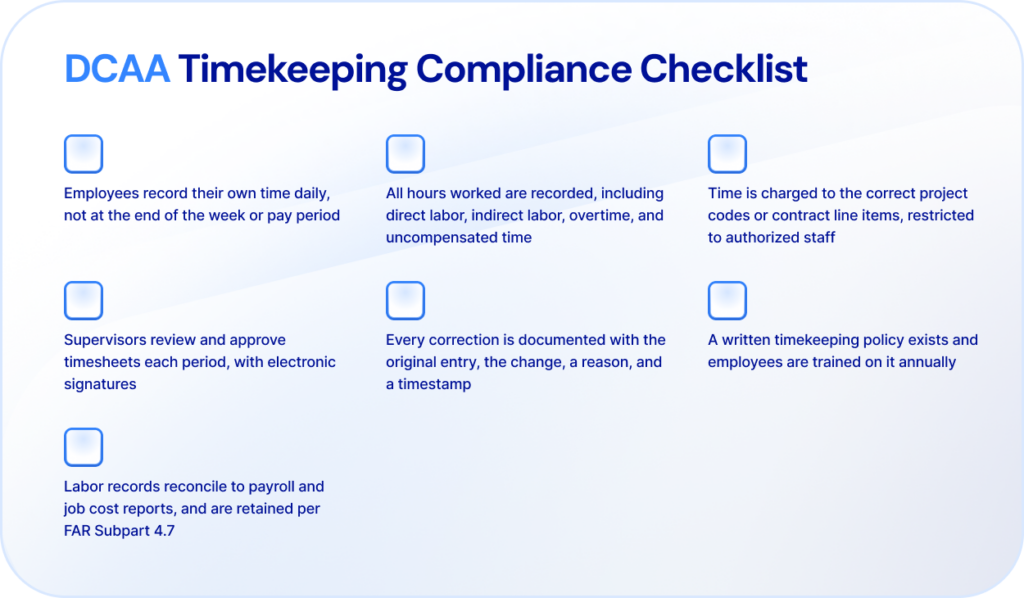
The DCAA’s timekeeping expectations come from the DCAA Contract Audit Manual and decades of audit practice rather than a single regulation, but they are remarkably consistent. Any DCAA-compliant timekeeping system, whether software or (bravely) paper, must support the practices below. Miss one, and your labor costs become the first thing auditors challenge.
Daily Time Entry by Each Employee
The DCAA requires employees to record their own work hours every day, in ink or electronically, never in advance and never reconstructed at the end of the week. Delegating entry to admins or supervisors is a red flag: the person who worked the hours must be the person who records them.
This is where most violations happen in practice, which is why automated reminders and mobile time entry have become standard features of compliant time tracking software.
Total Time Accounting
Contractors must record all hours worked, not just billable hours. That includes direct labor on specific contracts, indirect labor such as overhead and G&A activities, paid leave, and uncompensated overtime for salaried staff. Total time accounting is what allows direct and indirect costs to be allocated accurately across government contracts.
A system that only captures client-facing time entries fails this test immediately, because indirect labor hours are exactly what auditors use to verify your indirect costs.
Charging Time to the Correct Project Codes
Every hour must be charged to the correct cost objective: a contract, task order, or indirect account. A compliant time tracking system restricts project codes so employees only see the specific contracts they are authorized to charge, which prevents accidental mischarging, the costliest labor error in government contracting.
Supervisor Approval Workflows
Supervisors must review and approve timesheets each pay period, verifying that hours worked match assignments. The DCAA expects both the employee and the supervisor to sign, electronically or on paper, and expects timesheets to be submitted promptly at period end. Software-enforced approval workflows with sign-off records turn this from an honor system into evidence.
Documented Corrections With a Detailed Audit Trail
Mistakes are allowed; silent edits are not. When a time entry changes, the record must preserve the original entry, the correction, who made it, when, and why. Electronic timekeeping systems handle this with audit logs that capture usernames, timestamps, and change reasons automatically, producing the detailed audit trail auditors ask for first.
Written Policies and Employee Training
The DCAA expects a written timekeeping policy covering all the rules above, plus documented employee training, typically annual. During an audit, employees may be interviewed about the policy, so training records matter as much as the policy document itself. Software helps here too: onboarding flows and enforced workflows keep daily practice aligned with the written policy.
Reporting, Retention, and Floor Check Readiness
Finally, your timekeeping data must reconcile to payroll and job cost reports, support labor distribution, and remain retrievable for the retention periods in FAR Subpart 4.7. The DCAA also conducts unannounced floor checks, interviewing employees and comparing their answers to live timesheet data. Strong reporting capabilities and audit ready records make a floor check uneventful instead of existential.
The 7 Best DCAA-Compliant Time Tracking Software Systems: Comparison
Here are the seven systems government contractors most often shortlist for DCAA-compliant time tracking, compared on fit, strengths, and pricing. As always, none is DCAA-certified, because certification does not exist. The difference is how much of the compliance burden each system carries for you.
| Software | Best For | Key Strengths | Starting Price |
| BigTime | Professional services firms with government contracts | DCAA-oriented time tracking inside a full PSA platform: approvals, audit trails, job costing, and billing | From ~$20/user/mo |
| Hour Timesheet | Small contractors needing timekeeping only | Purpose-built DCAA timekeeping, low cost; little beyond the timesheet | $8/user/mo |
| Unanet GovCon | Mid-market GovCons on Unanet ERP | Time and expense tied to ERP; demanding setup, per-seat costs climb | From ~$4,000/yr (10 employees) |
| Deltek Costpoint T&E | Large primes already on Costpoint | Deep compliance enforcement; clunky UI, heavy admin, ecosystem lock-in | Quote-based (high TCO) |
| QuickBooks Time | QuickBooks-first small businesses | Familiar and mobile-friendly; not compliance-oriented without careful configuration | From ~$20/mo base + per user |
| ClockWise (GHG) | Small GovCons wanting a compliance-focused timesheet | DCAA-aware design and payroll integrations; dated interface, small vendor | Quote-based |
| SpringAhead | Legacy users with simple needs | Simple time and expense with QuickBooks sync; aging platform, minimal development | Quote-based |
BigTime
G2: 4.5/5 | Capterra: 4.6/5

BigTime is an AI-powered PSA platform built for professional services firms, and time tracking is its beating heart. For government contractors in consulting, engineering, architecture, and IT services, BigTime delivers the DCAA timekeeping essentials, daily entry, approvals, and a complete audit trail, inside a platform your team will actually enjoy using. That adoption point matters more than it sounds: compliant timekeeping only works when people track time every day, and reviewers consistently rank BigTime among the easiest systems for exactly that.
Just as important, your time entries don’t stop at the timesheet. Approved hours flow directly into job costing, utilization reporting, and invoicing, so the same data that satisfies a DCAA auditor also tells you which government contracts are profitable.
Key Features
- Daily time entry with automated reminders, mobile apps, and timers, so employees track time as they work rather than reconstructing it later.
- Supervisor approval workflows with electronic sign-off, submission deadlines, and resubmission controls.
- Audit logs on every timesheet capturing edits, reasons, users, and timestamps, giving auditors the detailed audit trail they expect.
- Project code control by staffer, so employees charge time only to specific contracts and tasks they are authorized to work.
- Total time capture across billable, non-billable, direct labor, and indirect labor hours, feeding accurate labor distribution.
- Real-time reporting on hours worked, labor costs, utilization, and budgets, with QuickBooks and Sage Intacct integrations carrying approved time straight into your accounting systems.
Who It’s Best For
BigTime is the best DCAA-compliant timekeeping software choice for professional services firms that hold government contracts alongside commercial work. If you need compliant time tracking and want project management, resource planning, and billing in the same platform, rather than bolting a standalone timesheet onto three other systems, BigTime is the strongest option in this comparison.
DCAA Compliance
BigTime supports the DCAA timekeeping requirements that decide audits: daily entry, total time accounting, restricted project codes, approval workflows, and change-logged audit trails. Paired with a written timekeeping policy and your accounting system of record, BigTime gives your firm audit ready records without adding administrative burden, and it scales with you as contract volume grows.
Pricing
Transparent per-user pricing starting at roughly $20 per user, per month, with higher tiers adding resource management and advanced analytics. Implementation takes weeks, not months, and there is no separate module to license just to make timekeeping compliant. Book a demo at bigtime.net to see it live.

Hour Timesheet
Capterra: 4.5/5 | G2: 4.3/5
Hour Timesheet is a timekeeping-only system built specifically around DCAA rules, and within that narrow lane it performs well. It is the honest budget pick on this list, provided you accept that a timesheet is all you’re buying.
Key Features
- Daily entry reminders, charge code restrictions, and employee and supervisor signatures.
- Audit trail with usernames, IP addresses, timestamps, and required reasons for edits.
- QuickBooks (Online and Desktop) integration plus leave and overtime tracking.
Who It’s Best For
Small government contractors and SBIR awardees who need compliant timekeeping bolted onto an existing accounting setup at minimal cost.
DCAA Compliance
Genuinely strong for the core DCAA timekeeping requirements; compliance is the product’s entire reason to exist. The limits show elsewhere: no project management, no billing, thin reporting capabilities, and a dated interface, so expect to run several other systems around it as the firm grows.
Pricing
A single plan at $8 per user, per month with all compliance features included. Simple and cheap, but budget for the surrounding software it doesn’t replace.
Unanet GovCon (Time & Expense)
G2: 4.4/5 | Capterra: 4.4/5
Unanet’s time and expense module enforces DCAA rules tightly and feeds the wider Unanet ERP. As a timekeeping choice it makes most sense if you’re committed, or heading, to Unanet as your accounting platform; as a standalone it’s a heavy lift.
Key Features
- Enforced daily entry, charge code control, and DCAA timesheet rules including JTR travel logic.
- Approval workflows with full audit logs, tied directly to labor distribution and billing.
- DCAA-output-ready reports for audits and incurred cost submissions.
Who It’s Best For
Mid-market government contractors running (or migrating to) Unanet ERP who want time, expense, and financials in one database.
DCAA Compliance
Excellent enforcement once configured. The caveats are operational: reviewers describe implementation as difficult and expensive, the interface as click-heavy, and the learning curve for advanced features as steep, friction that undermines the daily-entry habit compliance depends on.
Pricing
Scales with headcount, from roughly $4,000 per year for 10 employees. Per-seat economics deteriorate as you grow, and the time module’s value assumes you’re buying the broader platform.
Deltek Costpoint Time & Expense
G2: 4.2/5 | Capterra: 4.0/5
Costpoint’s time and expense module is the default at large defense primes, and its compliance enforcement is airtight. It is also the system employees complain about most in public reviews, which matters when compliance depends on people entering time every single day.
Key Features
- Strict enforcement of DCAA timekeeping requirements with hard controls on codes and corrections.
- Native integration with Costpoint labor distribution, payroll, and incurred cost submissions.
- Time and expense entry via Microsoft Teams and Outlook on newer releases.
Who It’s Best For
Large contractors already running Costpoint ERP, where the module is effectively bundled into the ecosystem decision.
DCAA Compliance
As rigorous as it gets, assuming expert configuration. The trade-offs are familiar Deltek ones: a clunky, non-intuitive interface, extra clicks for supervisors who approve timesheets, and administration that demands dedicated staff. Buying it outside a Costpoint commitment rarely makes sense.
Pricing
Quote-based, bundled into Costpoint licensing with the highest total cost of ownership in this comparison. Implementation timelines run months.
QuickBooks Time
Capterra: 4.7/5 | G2: 4.5/5
QuickBooks Time (formerly TSheets) is excellent general-purpose time tracking software, and that is precisely the problem: it was built for payroll and job costing, not for DCAA audits. Contractors use it successfully, but only with careful configuration and discipline the software itself won’t enforce.
Key Features
- Mobile clock-in with GPS, timers, and scheduling that employees genuinely find easy.
- Timesheet approvals and signatures, with activity logs on changes.
- Native sync with QuickBooks payroll, invoicing, and job costing.
Who It’s Best For
Very small contractors deep in the QuickBooks ecosystem, with simple contracts and a strong written policy compensating for the software’s gaps.
DCAA Compliance
Achievable but manual. QuickBooks Time doesn’t enforce daily entry, restrict charge codes with GovCon granularity, or require documented reasons on every edit out of the box; those controls fall on your policies. Single-level approvals and payroll-first design mean the compliance burden stays with you rather than the system.
Pricing
From roughly $20 per month base plus per-user fees, on top of a QuickBooks Online subscription. Costs stack up faster than the sticker suggests, and reviewers regularly flag it as expensive for what it enforces.
ClockWise (GHG)
ClockWise by GHG Corporation is a DCAA-focused timekeeping system frequently recommended by GovCon accounting consultancies. It covers the compliance fundamentals credibly; the buying risk is the thin public evidence and a product that shows its age.
Key Features
- Daily entry enforcement, charge code restrictions, and supervisor approvals designed around DCAA rules.
- Audit trails with documented corrections and reasons.
- Payroll and accounting integrations, including QuickBooks and ADP.
Who It’s Best For
Small contractors whose accountants or outsourced GovCon firms already support ClockWise workflows.
DCAA Compliance
Solid on the fundamentals, and its consultant following exists for a reason. But with very few independent reviews on G2 or Capterra, buyers are relying on references rather than public track record, and the interface trails modern time tracking software by a generation.
Pricing
Quote-based, positioned for small business budgets. Ask directly about mobile capabilities and reporting before committing.
SpringAhead
SpringAhead is a lightweight time and expense system with a long history in government contracting circles. It still works for simple use cases, but it is the legacy option on this list, and it feels like one.
Key Features
- Web-based time entries with approvals and project tracking.
- Expense reporting alongside timekeeping.
- QuickBooks synchronization for payroll and invoicing.
Who It’s Best For
Existing SpringAhead users with straightforward contracts and no appetite for change management.
DCAA Compliance
The basics, daily entry, approvals, and an audit trail, are present. Development has visibly slowed, the interface is dated, mobile support is weak, and public reviews are scarce. For a new purchase in 2026, more current options deliver the same compliance with less friction.
Pricing
Quote-based. Low cost historically, but weigh the savings against a platform with minimal ongoing investment.
How to Choose the Right System for Your Business
Match the system to your contract profile and where the firm is heading:
- Startup or single SBIR award: Keep costs minimal. Hour Timesheet or ClockWise covers DCAA timekeeping requirements for a few dollars per user, paired with your existing accounting software and a written policy.
- Growing professional services firm with FFP and T&M government contracts: This is BigTime territory. You get compliant time tracking plus the project management, utilization, and billing capabilities a services firm needs anyway, in one platform employees actually use daily. One system instead of three keeps both compliance and margins visible.
- Scaling contractor with multiple cost-reimbursable contracts: If you’re moving onto a GovCon ERP, take its native time module: Unanet Time & Expense with Unanet, Costpoint T&E with Costpoint. Standalone timekeeping stops making sense once labor distribution lives in the ERP.
Whichever way you go, evaluate total cost of ownership rather than per-user price: implementation, training, payroll and accounting integrations, and the ongoing effort of maintaining DCAA compliance, including policy updates, annual training, and internal audits of your own timesheets. And weigh adoption heavily. A technically compliant system that employees resist produces late, reconstructed time entries, which is exactly the failure a DCAA auditor is trained to find.
Make Every Timesheet Audit Ready
DCAA compliance is won or lost in the daily habit of tracking time correctly. The right software makes that habit effortless: entries happen daily, project codes are controlled, supervisors approve timesheets on schedule, and every change leaves a documented trail. The wrong software makes compliance a monthly cleanup exercise that an auditor will eventually notice.
For professional services firms working on government contracts, BigTime delivers DCAA-compliant time tracking inside a platform that also runs your projects, resources, and billing. Your team gets software they don’t fight; you get audit ready records and real-time visibility into labor costs and profitability. That combination is why growing firms choose BigTime.

FAQ
What Are the DCAA Timekeeping Requirements?
The core DCAA timekeeping requirements: employees record their own time daily, all hours worked are captured (direct and indirect labor), time is charged to correct project codes, supervisors approve timesheets each period, and corrections are documented with reasons and timestamps. A written policy and employee training round out compliance.
Is Paper or Excel Timekeeping DCAA Compliant?
Technically, yes. The DCAA accepts manual timekeeping if employees record time daily in ink, corrections are lined out and initialed, and supervisors sign each timesheet. In practice, manual systems produce the errors that fail audits, which is why most government contractors move to electronic timekeeping systems with built-in audit trails.
What Is a DCAA Floor Check?
A floor check is an unannounced DCAA audit of your timekeeping practices. Auditors visit (or call) and interview employees about what they’re working on, how they track time, and whether they know the timekeeping policy, then compare answers against live timesheet data. Daily entries and trained employees make floor checks routine.
Is QuickBooks Time DCAA Compliant?
Not by itself. QuickBooks Time can support DCAA compliance with careful configuration, strict written policies, and disciplined approval processes, but it doesn’t enforce daily entry, granular charge code restrictions, or documented edit reasons natively. Contractors often pair QuickBooks accounting with a system like BigTime that carries those controls built in.
What Happens if My Timekeeping Fails a DCAA Audit?
Consequences scale with severity: questioned or disallowed labor costs, payment withholds, corrective action demands, and repeat audits. Serious or willful mischarging can lead to contract termination, suspension from future contracts, and even False Claims Act liability. Since labor drives most contract costs, timekeeping findings are the most expensive findings to have.




